Estimated Reading Time: 1 min
Windows 10 will automatically download and update your system in the background without any interaction from the user. To change the way this happens, you can use a Windows 10 Pro feature called gpedit. This is not available on Windows 10 Home edition.
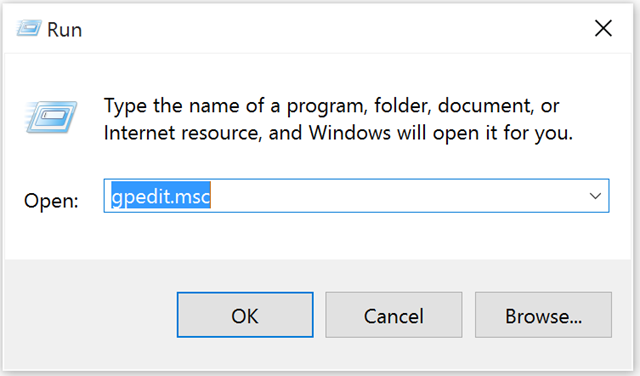
1. Click Start > Run and type gpedit.msc
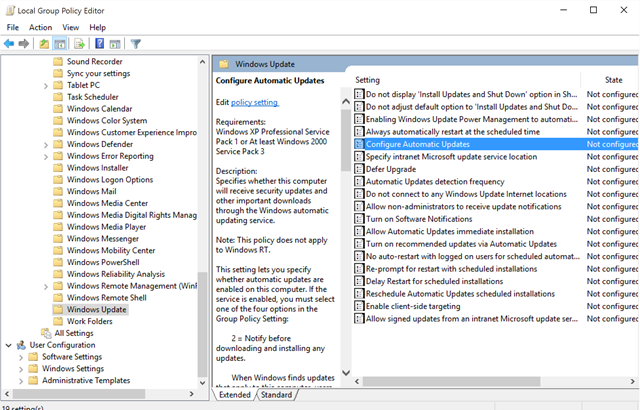
2. Browse to Computer Configuration > Administrative Templates > Windows Components > Windows Update. Click the Edit policy setting link in the right pane.
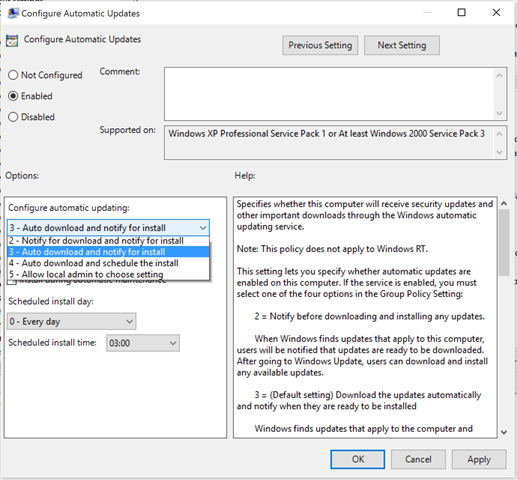
3. Select the option that fits your needs. I use ‘3 – Auto download and notify for install’ so it’s quick to install, but I can do it on my schedule.
MSTechPages is a participant in the Amazon Services LLC Associates Program, an affiliate advertising program designed to provide a means for sites to earn advertising fees by advertising and linking to Amazon.com. As an Amazon Associate, we earn from qualifying purchases at no extra cost to you.